
Block Distractions with One Click
Overview
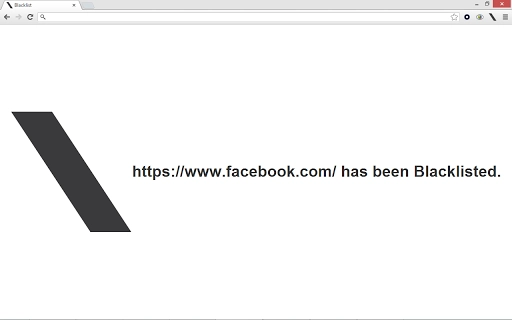
Blacklist is a straightforward browser extension designed to help users regain control over their online time. When a website begins to consume excessive attention, users can quickly block it by clicking the Blacklist button located in the upper right corner of the Chrome browser. This simple action prevents access to the site while the extension remains active. The tool is intended for individuals seeking to improve focus, reduce digital distractions, and enhance personal productivity. It is particularly suited for students, remote workers, and anyone managing time-sensitive tasks. The extension operates entirely within the Chrome environment, requiring no installation beyond the standard browser add-on process. Its minimal design ensures it does not interfere with browsing behavior or performance. Real-world scenarios include blocking social media during study sessions, preventing access to news sites during deep work periods, or limiting time spent on entertainment platforms. The developer did not provide additional information about the origin or background of the tool.
Key Features & Capabilities
- One-Click Site Blocking – Instantly block any website by clicking the Blacklist button in the Chrome toolbar. No configuration or settings required.
- Forced Waiting Period for Unblocking – To prevent impulsive re-access, users must wait 15 seconds after clicking “unlist” before being redirected to the blocked site’s root URL.
- Active Session Persistence – While the extension remains active, blocked sites stay inaccessible until explicitly unlisted.
- Simple, Non-Intrusive Design – The interface is minimal and located in the browser’s upper right corner, ensuring it does not disrupt workflow.
- Browser-Centric Operation – Works exclusively within Chrome, relying on browser permissions and extension APIs for functionality.
These features are ideal for users who need a no-frills distraction blocker. For example, a student preparing for exams can block YouTube or Reddit with a single click. A professional working on a deadline can prevent access to email or news sites during focused work blocks. The 15-second delay adds a psychological barrier to re-engaging with distracting content, supporting behavioral discipline. The tool does not track user behavior or collect browsing data, though the developer did not specify data handling practices.
User Interface, Workflow & Performance
The user interface of Blacklist is intentionally minimal. The extension icon appears in the Chrome toolbar, clearly labeled with a black icon and the word “Blacklist.” Clicking it reveals a small menu with two options: “Blacklist” and “Unlist.” The workflow is linear and intuitive: visit a site, click the button, choose to block, and confirm. To unblock, return to the site, click the button, and select “unlist,” then wait 15 seconds. This delay is designed to encourage reflection before re-engaging with the site. Navigation is limited to the extension’s toolbar presence and the two primary actions. The developer did not specify resource usage details. However, given its size of 1.2 MB and operation within the Chrome environment, it is expected to have low CPU and RAM impact. Performance observations are based on general software behavior patterns. Stability is assumed to be consistent with standard Chrome extensions, though no official reports on crashes or errors were provided.
Compatibility & System Requirements
Blacklist is compatible with Windows, Mac, and Linux operating systems, as it runs within the Google Chrome browser. The extension requires Chrome to be installed and updated to a version that supports extensions. The installation size is 1.2 MB, which is minimal and typical for browser add-ons. The developer did not specify exact system requirements such as RAM, CPU, or minimum Chrome version. Compatibility information was partially provided. Users on older versions of Chrome may experience issues, though no such cases were reported. The tool does not require administrative privileges for installation. It functions entirely within the browser’s sandboxed environment, reducing the risk of system-level interference.
Pros and Cons
Pros
- Simple, one-click interface ideal for quick distraction blocking
- Enforces a 15-second delay before unblocking, promoting focus discipline
- Lightweight at only 1.2 MB, minimal system impact
- Works across Windows, Mac, and Linux via Chrome
- Free to use with no hidden costs or subscriptions
Cons
- Only available for Chrome, not other browsers
- No customizable block durations or schedules
- Unblocking requires visiting the site first, which may be inconvenient
- Developer did not provide transparency on data handling
- Basic functionality with no advanced settings or analytics
Is Blacklist available for browsers other than Chrome?
Currently, Blacklist is designed exclusively for Google Chrome. It does not support Firefox, Edge, or other browser platforms.
Does Blacklist collect user data or track browsing activity?
The developer did not provide information about data collection or tracking practices. The extension operates within Chrome’s permission model, but no public privacy policy was shared.
Can I schedule automatic block times or set duration limits?
Blacklist does not include scheduling or time-based block features. Blocking is manual and active until explicitly unlisted.
Is the extension secure to install and use?
As a Chrome extension from the official Chrome Web Store, Blacklist is subject to Google’s security review. However, users should only install extensions from trusted sources and review permissions before granting access.
How do I update Blacklist to the latest version?
Updates are handled automatically by Chrome when available. Users should ensure Chrome is updated and check the extension’s page in the Chrome Web Store for release notes.
Final Thoughts + CTA
Blacklist delivers a focused, no-nonsense solution for users struggling with online distractions. Its simplicity is its greatest strength—no complex settings, no data collection, no clutter. The 15-second unblocking delay adds a meaningful psychological barrier that supports sustained concentration. While it lacks advanced features like scheduling or cross-browser support, it excels in its core purpose: helping users stay on task with minimal friction. The tool is ideal for students, freelancers, and professionals who need a reliable way to block time-wasting websites on the fly. With a free license, lightweight footprint, and broad OS compatibility via Chrome, Blacklist stands out as a practical productivity utility. For anyone seeking a secure, straightforward distraction blocker, this extension offers immediate value. Download Blacklist Chrome Extension now.







